Skip to content

Shopify

How to Issue Invoice System Compliant Qualified Invoices on Shopify (Free Template)

A step-by-step guide for Shopify merchants on issuing qualified invoices that meet Japan's Invoice System requirements using the Order Printer app, with a free template included.

How to Issue Invoice System Compliant Qualified Invoices on Shopify (Free Template)
Contents
  1. Overview of the Invoice System and What to Prepare
  2. How to Issue Invoices Compliant with the Invoice System (Shopify)
  3. Step 1: Install the Shopify app “Order Printer”
  4. Step 2: Add an Invoice System compliant invoice template in “Order Printer”
  5. Step 3: Configure the code in the new template
  6. Step 4: How to use the Invoice System compliant invoice
  7. Print preview
  8. Conclusion: Documents You Can Create with Order Printer

Japan’s Invoice System launches in October 2023. For merchants selling products on Shopify, it is important to be set up so you can issue qualified invoices.

In this article, we explain step by step how merchants using Shopify can issue invoices that meet the requirements of the Invoice System, along with a free template.

Overview of the Invoice System and What to Prepare

The Invoice System is a framework under which a buyer can claim the purchase tax credit for consumption tax by receiving a qualified invoice.
Once the Invoice System takes effect, you may find that business partners decline transactions on the grounds that you are not set up to handle invoices.

To issue these qualified invoices, a business must apply to its tax office for registration as a “qualified invoice issuer.”

If you have not yet completed your application to register as a qualified invoice issuer, please check the URL below.
National Tax Agency (Invoice System)

How to Issue Invoices Compliant with the Invoice System (Shopify)

In this article, we explain how merchants using Shopify can issue invoices that meet the requirements of the Invoice System.

Step 1: Install the Shopify app “Order Printer”

Shopify’s standard features cannot issue invoices compliant with the Invoice System, so we add the “Order Printer” app.
Order Printer

Step 2: Add an Invoice System compliant invoice template in “Order Printer”

Once installation is complete, click the “Manage templates” button at the top of the Order Printer screen to add a template.
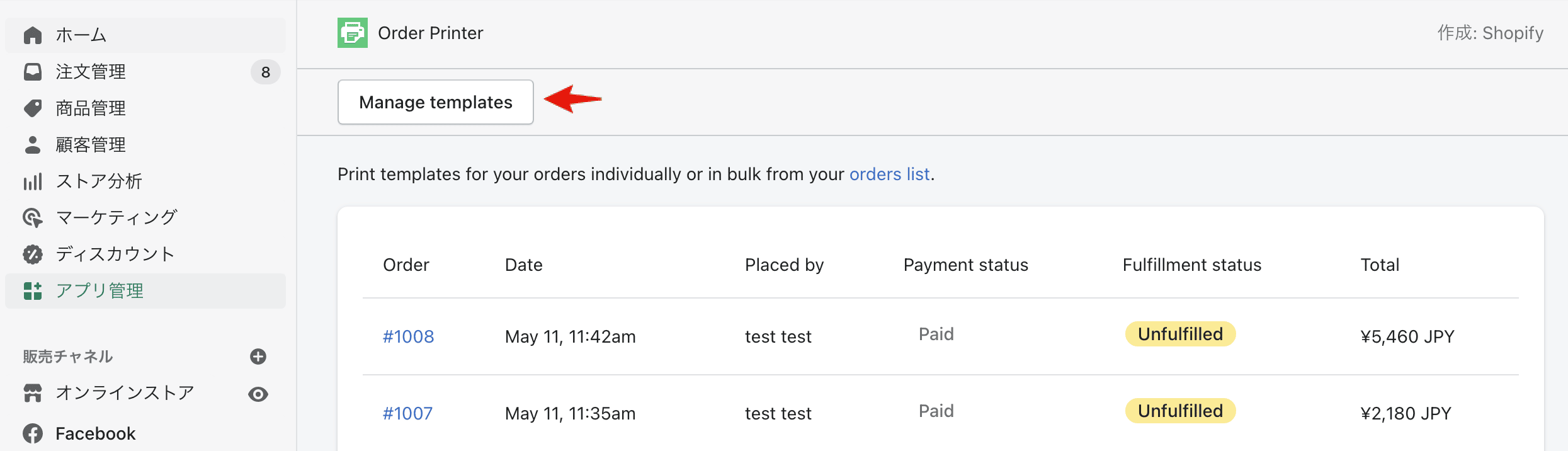
step2
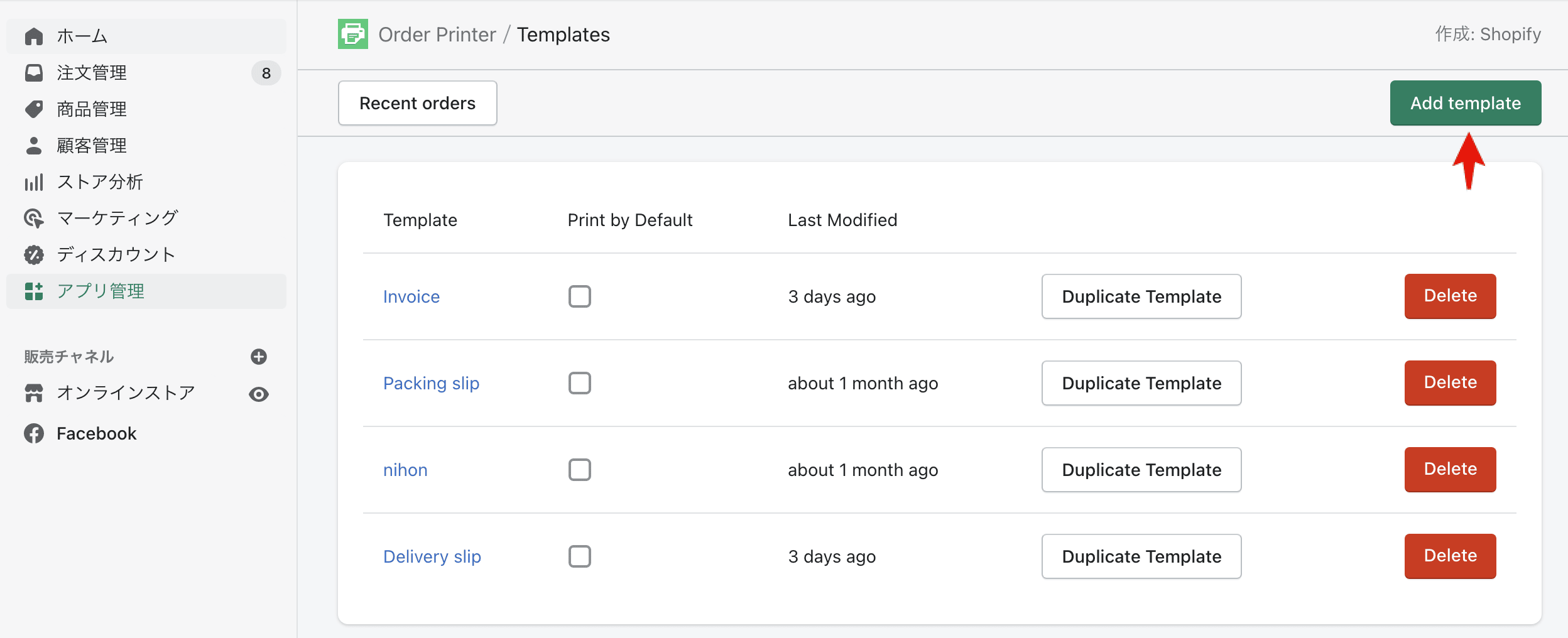
Click the “Add template” button in the upper right.
step3

Step 3: Configure the code in the new template

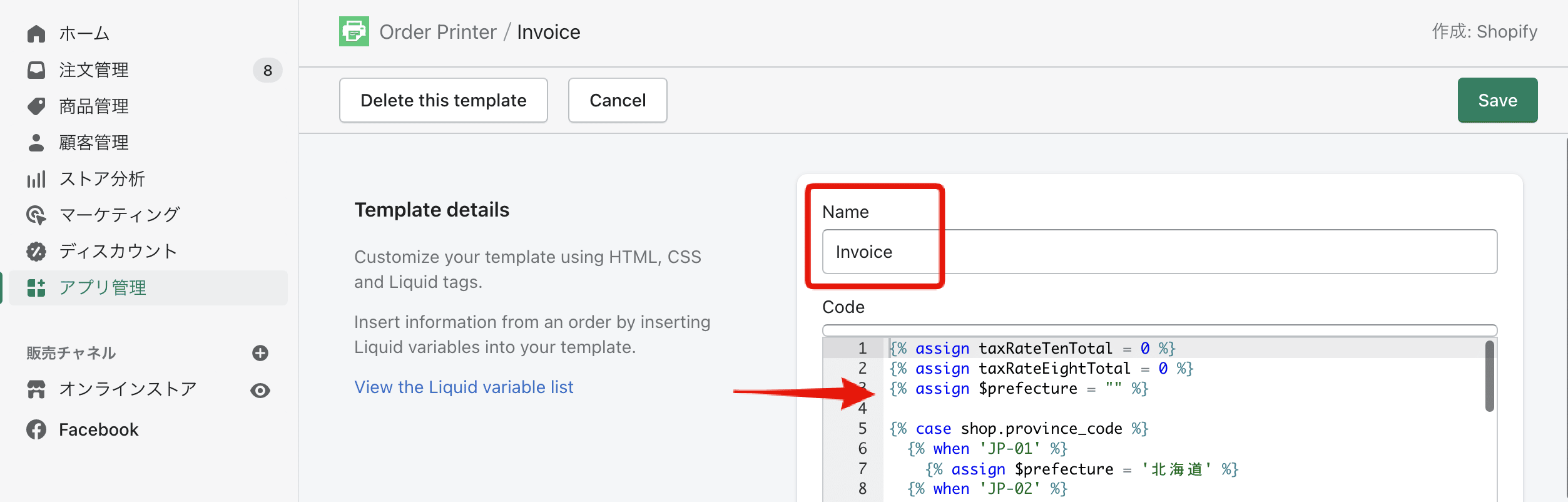
Enter any template name you like in the “Name” field. In the “code” field, paste the code from the template we provide, then click the “Save” button to save it.
Note: We are offering the template free of charge to the first 50 applicants.
step4

Step 4: How to use the Invoice System compliant invoice

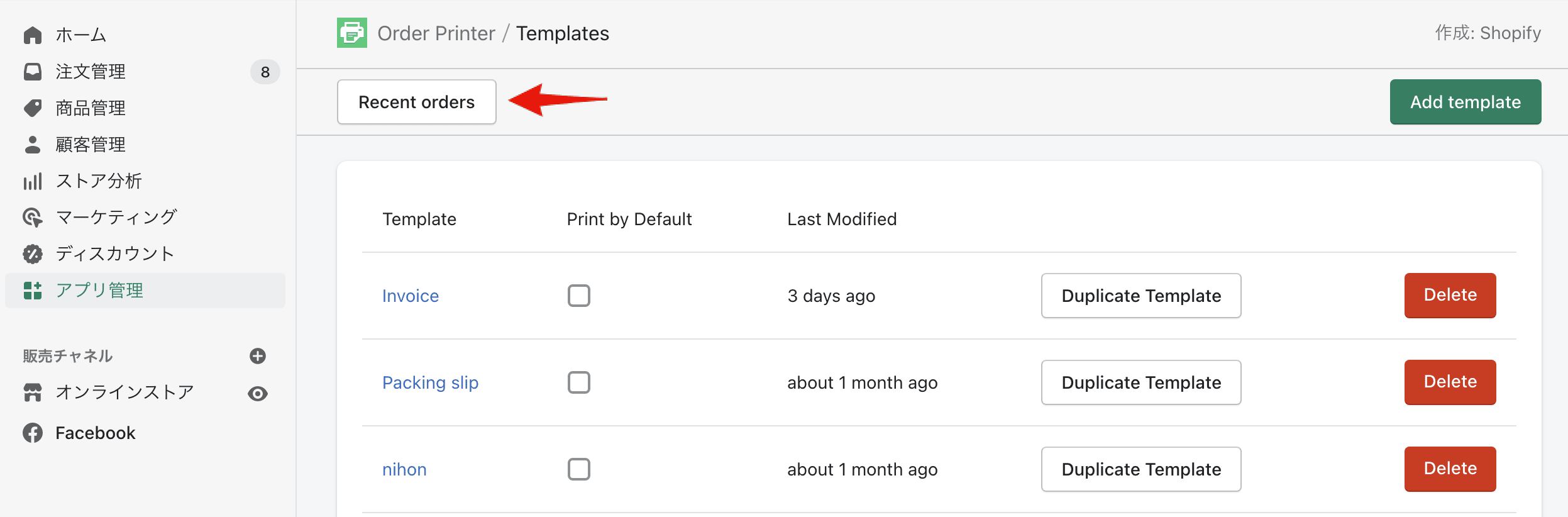
Go to the Recent orders screen and click the “Recent orders” button.
step6
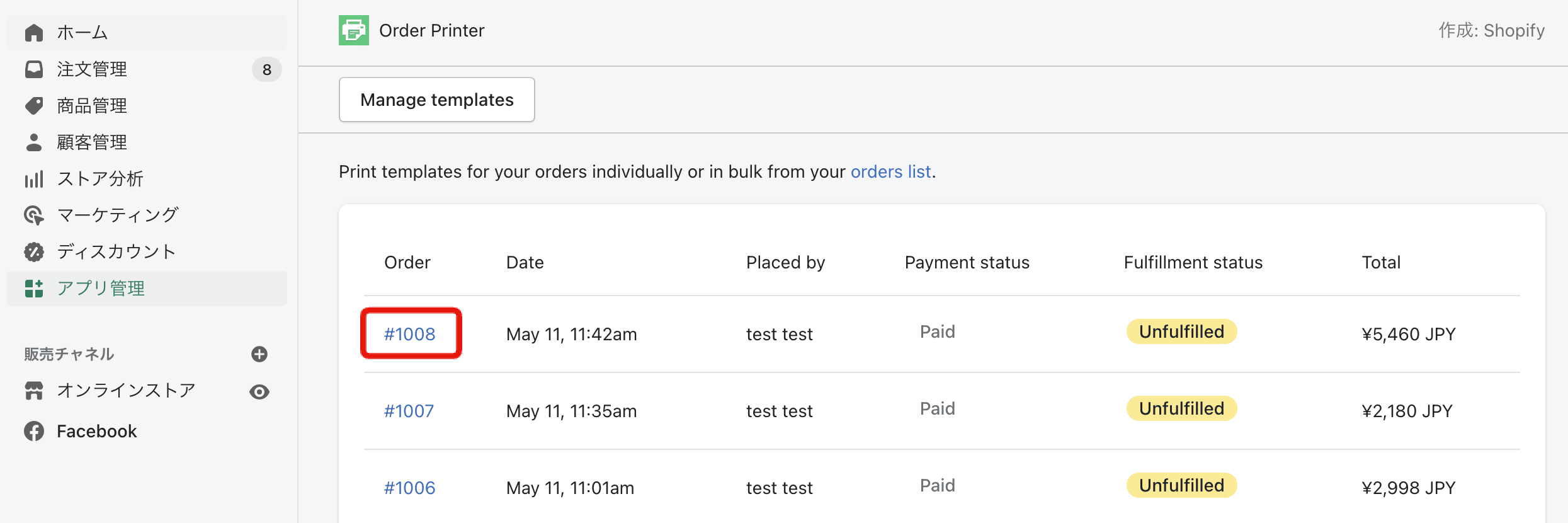
Select the order for which you want to issue an Invoice System compliant invoice or receipt.
step7
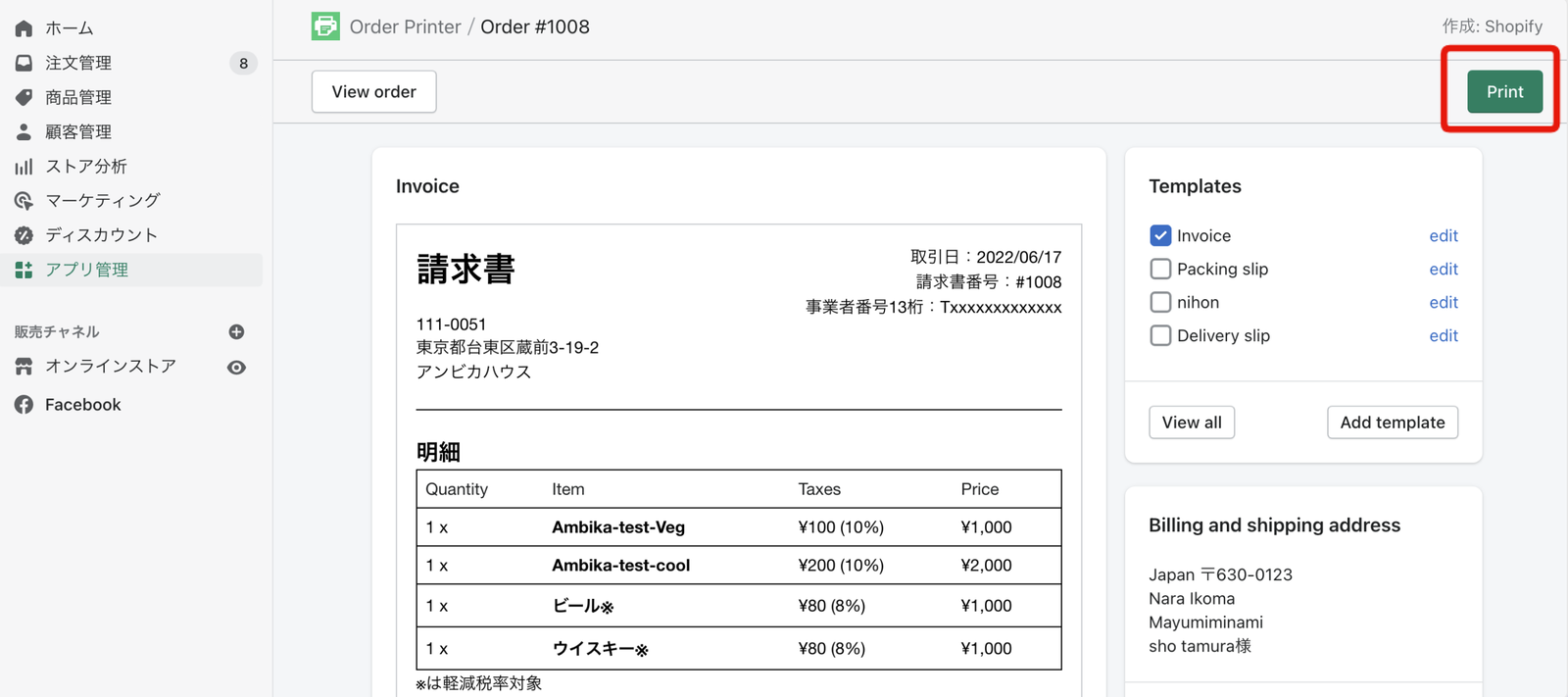
In the “Templates” field shown in the upper right of the screen, select the template you added in Step 3.
step8

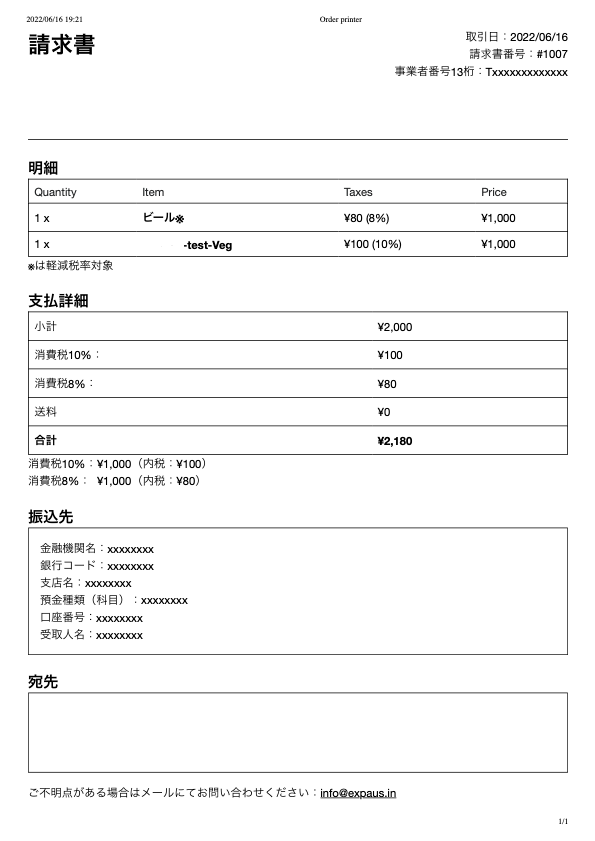
Below is an image of an actual printed qualified invoice.
Note: items included on the invoice

  • Registration number
  • Applicable tax rate
  • Consumption tax amount

Invoice sample

Conclusion: Documents You Can Create with Order Printer

With the Order Printer app introduced here, you can easily create documents beyond invoices, such as the following:

  • Delivery slips
  • Receipts
  • Labels

Since it is free to use, why not download it and give it a try?
Lxgic also handles the development and operation of Shopify stores. We support everything from building your Shopify store to ongoing operations that help boost sales, so if you are considering selling products on Shopify, please feel free to reach out.

Frequently asked questions

What is the Invoice System?

It is a framework under which a buyer can claim the purchase tax credit for consumption tax by receiving a qualified invoice. It launches in October 2023, and once it takes effect, business partners may decline transactions on the grounds that you are not set up to handle invoices.

What do I need in order to issue qualified invoices?

You must apply to your tax office to register as a qualified invoice issuer. If you have not yet completed the application, check the National Tax Agency (Invoice System) URL provided in the article.

Can Shopify's standard features handle the Invoice System on their own?

No. Shopify's standard features cannot issue Invoice System compliant invoices, so you add the "Order Printer" app to handle them.

What is included on an Invoice System compliant invoice?

It includes the registration number, the applicable tax rate, and the consumption tax amount.

What can Order Printer create besides invoices?

It can easily create delivery slips, receipts, and labels, and it is free to use.

Have a project in mind?

From strategy to build, we help end to end.

Start a conversation

Related reading

EC Site Building Why Shopify Is the Platform to Choose for Renewing or Switching Your EC Site

Why Shopify Is the Platform to Choose for Renewing or Switching Your EC Site

Why Shopify, the world's No.1 EC platform, is the choice for renewing or switching your EC site. We compare its 1,000+ design templates, 3,000+ apps, and headless commerce support against other platforms.

Read More
Shopify Shopify and Rakuten Ichiba Integration: Benefits Explained for E-Commerce Sellers

Shopify and Rakuten Ichiba Integration: Benefits Explained for E-Commerce Sellers

Shopify's sales-channel tie-up with Rakuten Ichiba opens new options for online sellers. Here are the concrete benefits, from wider sales channels to unified data management, plus the points to watch before you connect.

Read More
Shopify How to Automate Your Operations on Shopify: 7 Apps for Shipping, Inventory, and Reports

How to Automate Your Operations on Shopify: 7 Apps for Shipping, Inventory, and Reports

A practical guide to automating EC site operations on Shopify, covering shipping automation with SHIPPINO, apps for inventory, order management, and reporting, plus Shopify Flow templates.

Read More